I am currently developing a series of music education apps. If this is a field that interests you, feel free to take the code below and run it directly in your web browser. Like all the other free JavaScript apps available here on Beginner Projects, this one follows a simple, portable pattern.
Getting Started
- Security First: Conduct a security audit using your favorite AI. If this is your first app downloaded from Beginner Projects, please take a moment to read: The Golden Rule of Free Code.
- Save Locally: Copy the code and save it to your computer.
Suggestion: Save the file as note-names-app.html - Launch: Open the saved file in any web browser.
Why Use This App?
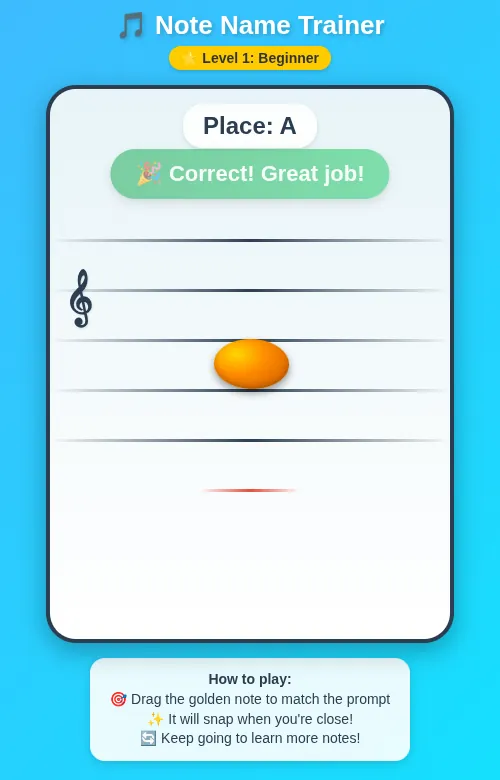
If you have children starting piano lessons this fall, this app provides a fun, interactive way to practice reading music. As with any skill, the more time we spend engaging with the material, the faster we improve.
 <!DOCTYPE html>
<html lang="en">
<head>
    <meta charset="UTF-8">
    <meta name="viewport" content="width=device-width, initial-scale=1.0">
    <title>Music Note Trainer - Level 1</title>
    <style>
        body {
            background: linear-gradient(135deg, #4facfe 0%, #00f2fe 100%);
            margin: 0;
            padding: 20px;
            font-family: 'Comic Sans MS', 'Arial Rounded MT Bold', Arial, sans-serif;
            display: flex;
            flex-direction: column;
            align-items: center;
            min-height: 100vh;
        }

        h1 {
            color: white;
            text-shadow: 2px 2px 4px rgba(0,0,0,0.2);
            margin-bottom: 5px;
            font-size: 26px;
        }

        .badge {
            background: #ffcc00;
            color: #333;
            padding: 4px 12px;
            border-radius: 12px;
            font-size: 14px;
            font-weight: bold;
            margin-bottom: 15px;
            box-shadow: 0 2px 4px rgba(0,0,0,0.15);
        }

        .music-container {
            width: 400px;
            height: 550px;
            border: 4px solid #2c3e50;
            border-radius: 30px;
            margin: 0 auto;
            background: linear-gradient(to bottom, #e8f4f8, #ffffff);
            position: relative;
            overflow: hidden;
            box-shadow: 0 8px 25px rgba(0, 0, 0, 0.3);
        }

        .staff-line {
            position: absolute;
            width: 100%;
            height: 3px;
            background: linear-gradient(to right, transparent, #2c3e50, transparent);
            border-radius: 2px;
        }

        .helper-line {
            position: absolute;
            width: 100px;
            height: 3px;
            background: linear-gradient(to right, transparent, #e74c3c, transparent);
            left: 150px;
            border-radius: 2px;
        }

        .draggable-oval {
            position: absolute;
            width: 75px;
            height: 50px;
            border-radius: 50%;
            cursor: grab;
            z-index: 10;
            background: radial-gradient(ellipse at 30% 30%, #ffd700 0%, #ff8c00 40%, #cc5500 100%);
            transform: skewX(2deg);
            box-shadow:
                0 4px 8px rgba(0,0,0,0.4),
                inset 0 -3px 6px rgba(0,0,0,0.2);
            transition: transform 0.1s ease;
        }

        .draggable-oval:active {
            cursor: grabbing;
            transform: skewX(2deg) scale(1.05);
        }

        .message {
            position: absolute;
            top: 60px;
            left: 50%;
            transform: translateX(-50%);
            background: linear-gradient(to right, #27ae60, #2ecc71);
            color: white;
            padding: 12px 25px;
            border-radius: 25px;
            font-weight: bold;
            text-align: center;
            z-index: 20;
            font-size: 22px;
            box-shadow: 0 4px 10px rgba(0,0,0,0.2);
            opacity: 0;
            transition: opacity 0.3s ease;
            white-space: nowrap;
        }

        .message.show { opacity: 1; }
        .message.error { background: linear-gradient(to right, #e74c3c, #c0392b); }

        .note-display {
            position: absolute;
            top: 15px;
            left: 50%;
            transform: translateX(-50%);
            font-size: 24px;
            font-weight: bold;
            z-index: 20;
            text-align: center;
            color: #2c3e50;
            background: rgba(255,255,255,0.85);
            padding: 8px 20px;
            border-radius: 20px;
            box-shadow: 0 2px 5px rgba(0,0,0,0.1);
        }

        .instructions {
            max-width: 400px;
            margin: 15px auto;
            padding: 12px 20px;
            background: rgba(255,255,255,0.9);
            border-radius: 15px;
            color: #2c3e50;
            font-size: 14px;
            text-align: center;
            box-shadow: 0 3px 10px rgba(0,0,0,0.15);
            line-height: 1.4;
        }

        .clef {
            position: absolute;
            left: 15px;
            top: 180px;
            font-size: 48px;
            color: #2c3e50;
            font-weight: bold;
            z-index: 5;
            text-shadow: 1px 1px 2px rgba(0,0,0,0.1);
        }
    </style>
</head>
<body>
    <h1>🎵 Note Name Trainer</h1>
    <div class="badge">🌟 Level 1: Beginner</div>

    <div class="music-container" id="musicContainer">
        <div class="clef">𝄞</div>
        <div class="note-display" id="noteDisplay">Loading...</div>
        <div class="message" id="message"></div>
    </div>

    <div class="instructions">
        <strong>How to play:</strong><br>
        🎯 Drag the golden note to match the prompt<br>
        ✨ It will snap when you're close!<br>
        🔄 Keep going to learn more notes!
    </div>

    <script>
        // ===== CONFIGURATION =====
        const CONFIG = {
            containerWidth: 400,
            containerHeight: 550,
            lineSpacing: 50,
            staffCenterY: 250,      // Center line (High B)
            noteWidth: 75,
            noteHeight: 50,
            tolerance: 30,          // Larger for beginners (was 25)
            helperLineY: 400        // Middle C ledger line
        };

        // ===== DOM ELEMENTS =====
        const container = document.getElementById('musicContainer');
        const noteDisplay = document.getElementById('noteDisplay');
        const messageEl = document.getElementById('message');

        // ===== GAME STATE =====
        let gameState = {
            currentNote: null,
            previousNote: null,
            isDragging: false,
            dragOffset: { x: 0, y: 0 },
            autoCorrectTimer: null
        };

        // ===== BEGINNER NOTE POOL (Low B → High C) =====
        // Positions represent the CENTER of the note
        const BEGINNER_NOTES = ['B3', 'C4', 'D4', 'E4', 'F4', 'G4', 'A4', 'B4', 'C5'];

        const NOTE_LABELS = {
            'B3': 'Low B',
            'C4': 'C',
            'D4': 'D',
            'E4': 'E',
            'F4': 'F',
            'G4': 'G',
            'A4': 'A',
            'B4': 'High B',
            'C5': 'High C'
        };

        const NOTE_POSITIONS = {
            'B3': 425,  // Space below helper line
            'C4': 400,  // Helper/ledger line
            'D4': 375,  // Space below bottom staff line
            'E4': 350,  // Bottom staff line
            'F4': 325,  // First space
            'G4': 300,  // Second line
            'A4': 275,  // Second space
            'B4': 250,  // Center line
            'C5': 225   // Third space
        };

        // ===== INITIALIZATION =====
        function init() {
            drawStaff();
            createDraggableNote();
            generateRandomNote();
            setupEventListeners();
        }

        // ===== DRAW STAFF LINES =====
        function drawStaff() {
            // 5 main staff lines
            for (let i = -2; i <= 2; i++) {
                const line = document.createElement('div');
                line.className = 'staff-line';
                line.style.top = (CONFIG.staffCenterY + i * CONFIG.lineSpacing) + 'px';
                container.appendChild(line);
            }

            // Helper line for Middle C
            const helperLine = document.createElement('div');
            helperLine.className = 'helper-line';
            helperLine.style.top = CONFIG.helperLineY + 'px';
            container.appendChild(helperLine);
        }

        // ===== CREATE DRAGGABLE NOTE =====
        function createDraggableNote() {
            const note = document.createElement('div');
            note.className = 'draggable-oval';
            note.id = 'draggableNote';

            // Start near bottom for easier drag distance
            const startX = (CONFIG.containerWidth - CONFIG.noteWidth) / 2;
            const startY = CONFIG.containerHeight - CONFIG.noteHeight - 20;

            note.style.left = startX + 'px';
            note.style.top = startY + 'px';

            container.appendChild(note);
        }

        // ===== EVENT LISTENERS =====
        function setupEventListeners() {
            const note = document.getElementById('draggableNote');

            note.addEventListener('mousedown', startDrag);
            document.addEventListener('mousemove', drag);
            document.addEventListener('mouseup', endDrag);

            note.addEventListener('touchstart', (e) => {
                e.preventDefault();
                startDrag(e.touches[0]);
            }, { passive: false });

            document.addEventListener('touchmove', (e) => {
                if (gameState.isDragging) {
                    e.preventDefault();
                    drag(e.touches[0]);
                }
            }, { passive: false });

            document.addEventListener('touchend', endDrag);
        }

        // ===== DRAG HANDLERS =====
        function startDrag(e) {
            gameState.isDragging = true;
            const note = document.getElementById('draggableNote');
            const rect = note.getBoundingClientRect();

            gameState.dragOffset.x = e.clientX - rect.left;
            gameState.dragOffset.y = e.clientY - rect.top;

            note.style.cursor = 'grabbing';
            note.style.transition = 'none';
        }

        function drag(e) {
            if (!gameState.isDragging) return;

            const note = document.getElementById('draggableNote');
            const containerRect = container.getBoundingClientRect();

            let newX = e.clientX - containerRect.left - gameState.dragOffset.x;
            let newY = e.clientY - containerRect.top - gameState.dragOffset.y;

            const maxX = CONFIG.containerWidth - CONFIG.noteWidth;
            const maxY = CONFIG.containerHeight - CONFIG.noteHeight;

            newX = Math.max(0, Math.min(newX, maxX));
            newY = Math.max(0, Math.min(newY, maxY));

            note.style.left = newX + 'px';
            note.style.top = newY + 'px';
        }

        function endDrag() {
            if (!gameState.isDragging) return;

            gameState.isDragging = false;
            const note = document.getElementById('draggableNote');
            note.style.cursor = 'grab';
            note.style.transition = 'transform 0.1s ease';

            checkNotePosition();
        }

        // ===== NOTE POSITION CHECKING =====
        function checkNotePosition() {
            const note = document.getElementById('draggableNote');
            const noteTop = parseInt(note.style.top, 10);
            const noteCenter = noteTop + (CONFIG.noteHeight / 2);

            const targetY = NOTE_POSITIONS[gameState.currentNote];
            if (targetY === undefined) return;

            const distance = Math.abs(noteCenter - targetY);

            if (distance <= CONFIG.tolerance) {
                // ✅ CORRECT! Snap to exact position
                note.style.top = (targetY - CONFIG.noteHeight/2) + 'px';
                showMessage("🎉 Correct! Great job!", false);

                if (gameState.autoCorrectTimer) clearTimeout(gameState.autoCorrectTimer);
                gameState.autoCorrectTimer = setTimeout(generateRandomNote, 1500);
            } else {
                // ❌ Try again
                showMessage("🎯 Try again!", true);
                setTimeout(() => {
                    if (messageEl.textContent && !gameState.isDragging) {
                        messageEl.textContent = '';
                        messageEl.className = 'message';
                    }
                }, 2000);
            }
        }

        // ===== SHOW MESSAGE =====
        function showMessage(text, isError) {
            messageEl.textContent = text;
            messageEl.className = 'message show' + (isError ? ' error' : '');

            if (isError) {
                setTimeout(() => {
                    if (messageEl.textContent === text) {
                        messageEl.textContent = '';
                        messageEl.className = 'message';
                    }
                }, 2000);
            }
        }

        // ===== GENERATE RANDOM NOTE =====
        function generateRandomNote() {
            let available = BEGINNER_NOTES.filter(n => n !== gameState.previousNote);
            if (available.length === 0) available = [...BEGINNER_NOTES];

            gameState.currentNote = available[Math.floor(Math.random() * available.length)];
            gameState.previousNote = gameState.currentNote;

            noteDisplay.textContent = `Place: ${NOTE_LABELS[gameState.currentNote]}`;

            const note = document.getElementById('draggableNote');
            const startX = (CONFIG.containerWidth - CONFIG.noteWidth) / 2;
            const startY = CONFIG.containerHeight - CONFIG.noteHeight - 20;

            note.style.transition = 'top 0.3s ease, left 0.3s ease';
            note.style.left = startX + 'px';
            note.style.top = startY + 'px';

            messageEl.textContent = '';
            messageEl.className = 'message';
        }

        // ===== START THE APP =====
        window.addEventListener('DOMContentLoaded', init);
    </script>
</body>
</html>
How to use the Note Names App
Once you have audited the code and saved the file, simply double-click it to open it in your default browser.
Instruct your child (or the student you are mentoring) to drag the golden note to the matching note name displayed at the top of the window. The goal of this free music game is to reinforce music theory concepts they have already learned. After the student has identified 10–20 notes, you can simply close the browser tab to exit the app. Think of it as a simple, standalone web page.
Supplemental Information
I am actively refining this tool; keep an eye on this page for new and improved versions in the coming days. If you have suggestions for improvements, please leave a comment below!