The “Travel” Experiment
For years, I had a peculiar habit. Whenever I traveled to Europe, I would “nuke” my laptop and install a temporary, minimal Linux distribution. The goal was simple: basic email, web browsing, and an emergency lifeline to my domain registrars and web hosts. Once I returned to Canada, the laptop would be wiped and restored to its primary OS.
In early 2025, during a trip to Europe, I chose MX Linux.
At first, I didn’t think it was anything special. It was Debian-based, it ran well on my 2021 ASUS Zephyrus, and it did the job. But as the weeks passed, I began to notice something. I discovered a series of thoughtful, integrated concepts that the MX Linux developers had baked into the system—tools that worked too well.
The “Stress Test”
When I returned to Canada, I did something I rarely do: I installed MX Linux on my main Dell PC.
I have learned the hard way not to judge a distribution after one hour of use or to rush to YouTube to post a glowing review. Instead, I decided to get tough on it. I began an aggressive “de-bloating” process, stripping away software to see exactly where the system would break.
It didn’t. I was stunned.
In my experience with other distributions, like Manjaro, removing a single disliked icon theme could send the entire system into a tailspin. But MX Linux was different. I could strip it down to almost nothing, and it remained rock solid.
The “Ironclad” Safety Net
Once the learning phase was over, I performed my “real” installation. I meticulously tuned the system: removing printing services, LibreOffice, Lucky Backup, and TimeShift—everything that didn’t serve a direct purpose. I crafted a custom theme, a beautiful icon set, and my favorite wallpaper.
Then, I reached the “crown jewel” of MX Linux: The Snapshot.
For those of us who deliver professional work on tight deadlines, Virtual Machines (VMs) have always been our safety net. I relied on them because I needed the ability to roll back changes instantly.
MX Linux is the first distribution that allows me to use my physical hardware as if it were a VM. The snapshot strategy is, quite simply, a work of genius. I can create a perfectly tuned snapshot and move it to an external LUKS-encrypted drive.
To put this into perspective: I could install Windows 11 on my machine, realize two hours later that it was a mistake, and within 15 minutes, I can create a bootable flash drive and restore my exact MX Linux environment—every setting, every config, every icon—exactly as it was. That level of recoverability is unheard of in the Linux world.
A Tailored Ecosystem
Today, my hardware setup is a symphony of efficiency:
- The Dell PC: A lean machine running a second NIC for LAN-only security. It handles my Email, Brave, OnionShare, VSCodium (with Python and Continue), PHP, and my latest addition, the Hermes Agent.
- The Zephyrus Laptop: Running the AHS (Advanced Hardware Support) version of MX. I was impressed by the thermal management; using the HDMI port instead of USB-C keeps the laptop barely lukewarm, even when pushing graphics-heavy apps like Blender or ComfyUI.
- The AI Hub: My laptop now serves as the foundation of my home lab, running Ollama, Forge WebUI, and Qwen3TTS. Even as a 2021 model, it still pulls high-end performance benchmarks thanks to the efficiency of the OS.
I’ve even found a comfortable workflow in XFCE, an underrated Desktop Environment that, in my opinion, is the perfect match for MX.
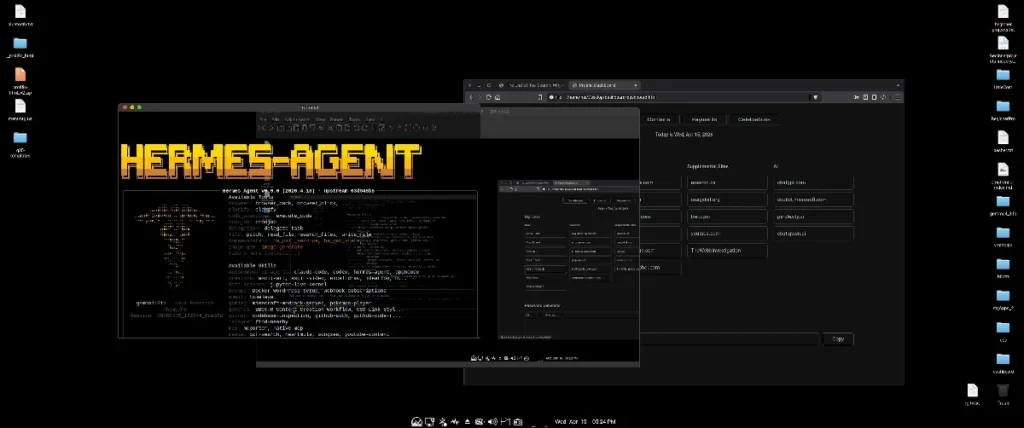
Quick tip: I didn’t use the desktop for storage before switching to MX Linux, but now I do. When creating backups, I simply uncheck “Desktop” so those files aren’t included in snapshots, since I already back up my work on a separate drive.
The “Quick and Dirty” Printing Hack
One final tip from my “big trick box.” I mentioned that I ripped out all printing services to keep my system clean. However, I still have an old HP printer.
Instead of cluttering my daily driver with print daemons that run for nothing all year, I keep an old Ubuntu 24.04 ISO on a flash drive. When I need to print a few pages, I live-boot into Ubuntu, let it automatically configure the printer, print my documents, and then reboot back into the purity of MX Linux. It’s a quick and dirty hack, but it makes Linux life significantly easier.
Final Thoughts: Reaching Nirvana
I have spent 25 years distro-hopping. I have installed Linux hundreds of times. But my hopping stopped in late 2025.
I have zero desire to live-boot the next Ubuntu version. I have zero urge to explore the “next big thing.” I have found the equilibrium between power, stability, and freedom.

If I had discovered MX Linux earlier, I might not have even bought the Mac. It is that good. For those of you still searching for your “last” distribution: stop looking at the benchmarks and start looking at the tools. I have reached Linux Nirvana, and it is running on MX.
Want to see how I use this setup for AI? Check out my post on deploying Gemma 4 with Ollama.