In this guide, I’ll break down the three main parts of the free Celebrations app. Think of this as a map of the software.
For many of you, the code inside that .html file looks like a jumble of symbols and brackets. You might be wondering: “What is actually happening in there? And can I change things without breaking it?”
1. The “Paint & Polish” (The CSS Section)
When you open your file, you’ll see a large section wrapped in <style> tags. This is the CSS (Cascading Style Sheets).
What it does: CSS is responsible for everything you see but don’t interact with. It tells the browser that the background should be dark, the fonts should be “Inter,” and that the “Days Until” tags should be Green, Orange, or Red.
💡 Pro Tip: If you are happy with how the app looks, then you can completely ignore this section. You don’t need to touch a single line of CSS for the app to work. However, if you’re feeling adventurous, you can ask an AI: “I have a CSS section in my HTML file; can you help me change the background color to a deep navy blue?”
2. The “Skeleton” (The HTML Body)
Further down, you’ll find the <body> section. This is the HTML portion.
What it does: If CSS is the paint, HTML is the framing of the house. It defines where the Title goes and where the Table is placed.
Where you’ll spend your time: The most important part of this section for you is the Data Array. Look for the part that looks like this:
const celebrations = [
  { name: "Name_1", type: "Birthday", date: "1963-09-05T00:00:00", notes: "Don't Email. Call 000.000.1234 instead. " },
  { name: "Name_2", type: "Birthday", date: "1961-12-19T00:00:00", notes: "Send flowers." }
];
This is where your personal information lives. Each person is wrapped in curly braces {}. As long as you keep the quotes "" and the commas , in the right place, you can add as many people as you like.
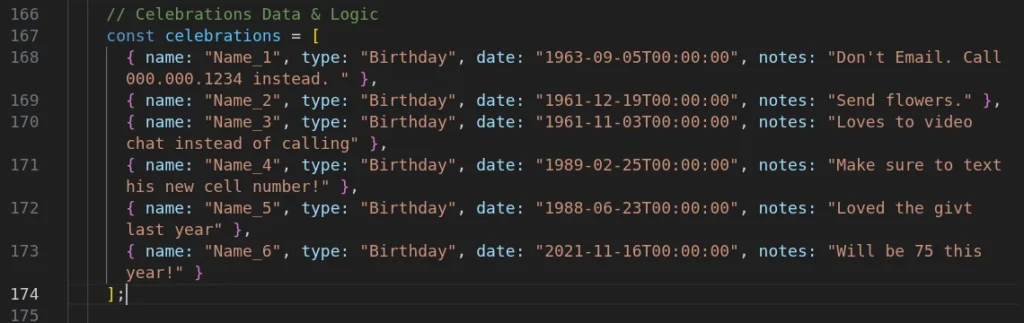
A Note on the Date Format: You’ll notice dates look like 1968-09-05T00:00:00. The T00:00:00 is a technical marker that tells the computer the date starts exactly at midnight. This ensures that no matter what time of day you open the app, the countdown remains accurate.
3. The “Brain” (The JavaScript Section)
At the bottom of the file, inside the <script> tags, is the JavaScript (JS).
What it does: This is the most powerful part of the app. While HTML and CSS are static, JavaScript is active. It is the “Brain” that performs the following logic:
The Math: It looks at today’s date, looks at the birthday, and calculates exactly how many days are left.
The Sorting: When you click “Name” or “Days Until,” the JS instantly rearranges the list for you. The sorting works by:
- Clicking “Name” sorts alphabetically from A to Z
- Clicking “Days Until” sorts from fewest to most days remaining
The Alert System: It decides which color tag to apply. If the math results in 3 or less days, the JS tells the CSS to turn the tag Red. If 4-7 days, it turns Orange. More than 7 days, it’s Green.
💡 Pro Tip: This is the perfect place to experiment with AI. Try pasting a section into an AI and asking: “Can you change this for me (be descriptive)?”
Summary: The Big Picture
To put it simply, your app is a team of three:
HTML builds the info table. CSS makes the app look professional. JavaScript does the math and presents the data.
By simply replacing some names in the HTML section, you’ve already performed your first “software configuration.” You’re no longer just a user of technology—you’re starting to control it.
Having trouble with your code? If you’ve tried to edit your list and the app stopped working, don’t panic! It usually means a comma or a quote mark is missing. Post a comment below with a snippet of your code, and I will help you find the error and get you back up and running.