Note: This is a complete “Single-File App.” All the code, instructions, and security steps required to successfully run this software are contained within this post. You can preview the app here
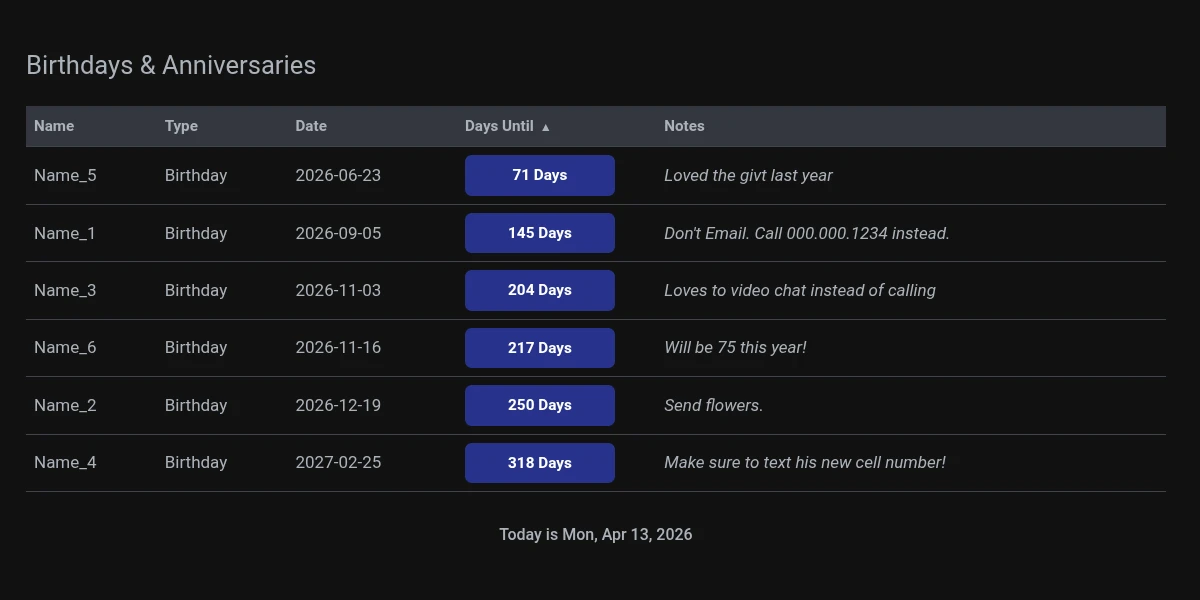
Preview this app right now in your browser
I have a strange memory. I can remember complex music compositions and navigate advanced software like Blender, FreeCAD, and ComfyUI with ease. But for some reason, remembering birthdays and anniversaries? I’m terrible at it.
If you’re in the same boat as me and need a dependable way to stay on top of important dates, you’ll love how simple this tool is.
⚠️ IMPORTANT: Security First (The AI Safety Check)
I want you to verify this software before you run it.
Even though I have provided this for free, it is a best practice to always verify code from the internet.
Before you save the code provided below, please do the following:
- Copy the code from the block at the bottom of this post.
- Open one of these AI tools:
- Paste the code and ask: “Can you check this HTML/JavaScript code for any security issues, vulnerabilities, or viruses?”
In a few seconds, the AI will confirm that the code is safe. Once you have that peace of mind, you are ready to go!
How to customize the app
If you are new to programming, then take a look at the app info page which will help you with changing the placeholder values to the actual names you want to use.
<!DOCTYPE html>
<html lang="en">
<head>
  <meta charset="UTF-8" />
  <title>Celebrations</title>
  <meta name="viewport" content="width=1280" />
  <style>
    :root {
      --bg-main: #121212;
      --bg-surface: #34373F;
      --text-primary: #abb2ba;
      --text-secondary: #abb2ba;
      --accent-primary: #4169E1;
      --accent-secondary: #45B52D;
      --domain-green: #27338b;
      --domain-green-text: #FFFFFF;
      --domain-orange: #F7B42C;
      --domain-orange-text: #2A2D34;
      --domain-red: #F85149;
      --domain-red-text: #FFFFFF;
      --border-subtle: #40444C;
      --border-radius: 7px;
      --spacing-unit: 20px;
      --font-sans: Inter, system-ui, sans-serif;
      --font-mono: Fira Code, monospace;
    }

    body {
      background-color: var(--bg-main);
      color: var(--text-primary);
      font-family: var(--font-sans);
      margin: 0;
      padding: 0;
      font-size: 1.0625rem;
      line-height: 1.6;
    }

    .dashboard-container {
      max-width: 1140px;
      margin: 0 auto;
      padding: calc(var(--spacing-unit) * 1.5) var(--spacing-unit);
    }

    h1 {
      font-size: 1.6rem;
      font-weight: normal;
      margin-bottom: 20px;
      color: var(--text-primary);
    }

    footer p {
      font-size: 1rem;
      font-weight: 500;
      color: var(--text-muted);
      margin-top: 20px;
      text-align: center;
    }

    .payments-table {
      width: 100%;
      border-collapse: collapse;
      margin-bottom: 30px;
    }

    .payments-table th,
    .payments-table td {
      padding: 8px;
      border-bottom: 1px solid var(--border-subtle);
      text-align: left;
    }

    .payments-table th {
      background-color: var(--bg-surface);
      color: var(--text-secondary);
      font-weight: 600;
      font-size: 0.95rem;
    }

    .days-remaining-tag {
      font-weight: 600;
      padding: 6px 10px;
      border-radius: var(--border-radius);
      display: inline-block;
      font-size: 0.9em;
    }

    .days-green {
      background-color: var(--domain-green);
      color: var(--domain-green-text);
    }
    .days-orange {
      background-color: var(--domain-orange);
      color: var(--domain-orange-text);
    }
    .days-red {
      background-color: var(--domain-red);
      color: var(--domain-red-text);
    }

    .notes-info {
      font-style: italic;
      color: var(--text-secondary);
      white-space: pre-wrap;
      word-break: break-word;
    }

    .full-cell {
      display: block;
      width: 60%;
      text-align: center;
      padding: 8px 20px;
      border-radius: var(--border-radius);
    }

    th.sortable {
      cursor: pointer;
      position: relative;
      user-select: none;
    }
    th.sortable::after {
      content: '';
      font-size: 0.8em;
      margin-left: 6px;
    }
    th.sortable.asc::after {
      content: '▲';
    }
    th.sortable.desc::after {
      content: '▼';
    }

    .celebration-table th,
    .celebration-table td {
      padding: 8px 12px;
    }
  </style>
</head>
<body>
  <div class="dashboard-container">
    <section id="celebration-section">
      <h1>Birthdays & Anniversaries</h1>
      <div id="celebration-table-wrapper"></div>
    </section>

    <footer>
      <p>Today is <span id="footer-date"></span></p>
    </footer>
  </div>

  <script>
    // Footer Date
    document.addEventListener("DOMContentLoaded", () => {
      const today = new Date();
      const dateSpan = document.getElementById("footer-date");
      if (dateSpan) {
        dateSpan.textContent = today.toLocaleDateString(undefined, {
          weekday: "short",
          year: "numeric",
          month: "short",
          day: "numeric"
        });
      }
      if (document.getElementById("celebration-table-wrapper")) renderCelebrationTable();
    });

    // Celebrations Data & Logic
    const celebrations = [
      { name: "Name_1", type: "Birthday", date: "1963-09-05T00:00:00", notes: "Don't Email. Call 000.000.1234 instead. " },
      { name: "Name_2", type: "Birthday", date: "1961-12-19T00:00:00", notes: "Send flowers." },
      { name: "Name_3", type: "Birthday", date: "1961-11-03T00:00:00", notes: "Loves to video chat instead of calling" },
      { name: "Name_4", type: "Birthday", date: "1989-02-25T00:00:00", notes: "Make sure to text his new cell number!" },
      { name: "Name_5", type: "Birthday", date: "1988-06-23T00:00:00", notes: "Loved the givt last year" },
      { name: "Name_6", type: "Birthday", date: "2021-11-16T00:00:00", notes: "Will be 75 this year!" }
    ];

    let celebrationSort = { column: "days", direction: "asc" };

    function getNextCelebrationCountdown(dateStr) {
      const today = new Date();
      const original = new Date(dateStr);
      const thisYear = new Date(today.getFullYear(), original.getMonth(), original.getDate());
      const nextYear = new Date(today.getFullYear() + 1, original.getMonth(), original.getDate());
      const eventDate = thisYear >= today ? thisYear : nextYear;

      const daysUntil = Math.ceil((eventDate - today) / (1000 * 60 * 60 * 24));
      let tag = "days-green";
      if (daysUntil <= 3) tag = "days-red";
      else if (daysUntil <= 7) tag = "days-orange";

      return { daysUntil, tag, displayDate: eventDate.toLocaleDateString("en-CA") };
    }

    function toggleCelebrationSort(key) {
      if (celebrationSort.column === key) {
        celebrationSort.direction = celebrationSort.direction === "asc" ? "desc" : "asc";
      } else {
        celebrationSort.column = key;
        celebrationSort.direction = "asc";
      }
      renderCelebrationTable();
    }

    function renderCelebrationTable() {
      let data = [...celebrations];
      if (celebrationSort.column) {
        data.sort((a, b) => {
          let x = a[celebrationSort.column];
          let y = b[celebrationSort.column];
          if (celebrationSort.column === "days") {
            x = getNextCelebrationCountdown(a.date).daysUntil;
            y = getNextCelebrationCountdown(b.date).daysUntil;
            return celebrationSort.direction === "asc" ? x - y : y - x;
          }
          return celebrationSort.direction === "asc"
            ? x.localeCompare(y)
            : y.localeCompare(x);
        });
      }

      let html = `<table class="payments-table"><thead><tr>
        <th class="sortable ${celebrationSort.column === "name" ? celebrationSort.direction : ""}" onclick="toggleCelebrationSort('name')">Name</th>
        <th>Type</th>
        <th>Date</th>
        <th class="sortable ${celebrationSort.column === "days" ? celebrationSort.direction : ""}" onclick="toggleCelebrationSort('days')">Days Until</th>
        <th>Notes</th></tr></thead><tbody>`;

      data.forEach(({ name, type, date, notes }) => {
        const { daysUntil, tag, displayDate } = getNextCelebrationCountdown(date);
        html += `<tr>
          <td>${name}</td>
          <td>${type}</td>
          <td>${displayDate}</td>
          <td><span class="days-remaining-tag ${tag} full-cell">${daysUntil} Days</span></td>
          <td class="notes-info">${notes}</td>
        </tr>`;
      });

      html += "</tbody></table>";
      document.getElementById("celebration-table-wrapper").innerHTML = html;
    }
  </script>
</body>
</html>You’ve Just Taken Your First Step into Software!
Congratulations! By following these steps, you didn’t just download a tool—you hosted your own local application. That is a huge win for anyone starting their journey with AI and coding.
If you run into any trouble, get stuck on a line of code, or need a hand adjusting the settings, please leave a comment below. I will do my absolute best to help you get it working perfectly.
What’s coming next? Stay tuned for the next release: the Payments Manager. Similar to the Celebrations app, it’s a clean, local tool, but it’s specialized for financial tracking and organizing your online banking needs.